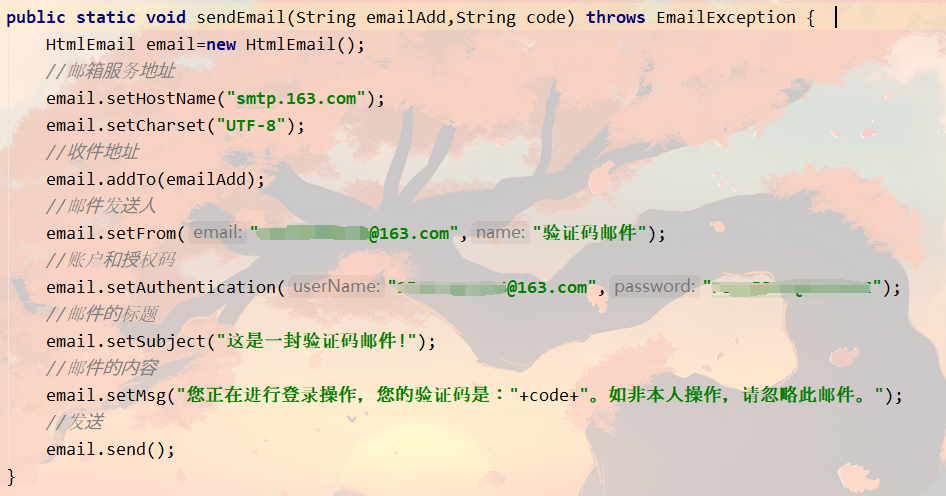
发送验证码通常涉及到以下几个步骤。生成验证码,将其发送到用户的手机或电子邮件。以下是一个简单的Java代码示例,使用JavaMail库发送包含验证码的电子邮件。请注意,这只是一个基本示例,您可能需要根据自己的需求进行修改和扩展。此外,还需要确保已经添加了JavaMail库到你的项目中。

你需要生成一个验证码,这可以使用Java的Random类完成,你需要设置邮件服务器以发送电子邮件,以下是一个简单的示例:
import java.util.Random;
import javax.mail.*;
import javax.mail.internet.*;
public class SendVerificationCode {
    public static void main(String[] args) {
        // 生成验证码
        String verificationCode = generateVerificationCode();
        System.out.println("Verification Code: " + verificationCode);

        // 设置邮件服务器信息
        String to = "[email protected]"; // 收件人的电子邮件地址
        String from = "[email protected]"; // 发件人的电子邮件地址
        String host = "smtp.example.com"; // SMTP服务器地址
        String username = "yourUsername"; // SMTP服务器的用户名
        String password = "yourPassword"; // SMTP服务器的密码或授权码
        Properties properties = System.getProperties();
        properties.setProperty("mail.smtp.auth", "true"); // 需要授权访问邮件服务器
        properties.setProperty("mail.smtp.starttls.enable", "true"); // 使用TLS加密连接邮件服务器
        properties.setProperty("mail.smtp.host", host); // 设置SMTP服务器地址
        properties.setProperty("mail.smtp.port", "587"); // 设置SMTP服务器端口号(通常为587)
        Session session = Session.getInstance(properties, new Authenticator() { // 创建会话对象,并设置认证器对象进行身份验证
            protected PasswordAuthentication getPasswordAuthentication() {
                return new PasswordAuthentication(username, password);
            }
        });
        try {
            MimeMessage message = new MimeMessage(session);
            message.setFrom(new InternetAddress(from));
            message.addRecipient(Message.RecipientType.TO, new InternetAddress(to));
            message.setSubject("Your Verification Code");
            message.setText("Your verification code is: " + verificationCode);
            Transport.send(message);
            System.out.println("Verification code sent successfully!");
        } catch (MessagingException e) {
            throw new RuntimeException(e);
        }
    }
    private static String generateVerificationCode() {
        Random randomGenerator = new Random();
        return Integer.toString(randomGenerator.nextInt(90000) + 10000); // 生成一个五位的随机验证码,如果需要更多位数可以修改nextInt的参数值。
    }
}
此代码示例中的用户名和密码是SMTP服务器的用户名和密码或授权码,不是收件人或发件人的电子邮件账户的密码,你需要替换邮件服务器地址、收件人和发件人的电子邮件地址等部分为你自己的信息,这个代码示例没有处理错误情况(例如网络问题或SMTP服务器的问题),你可能需要在实际使用时添加适当的错误处理代码。